# NodeLocal DNSCache
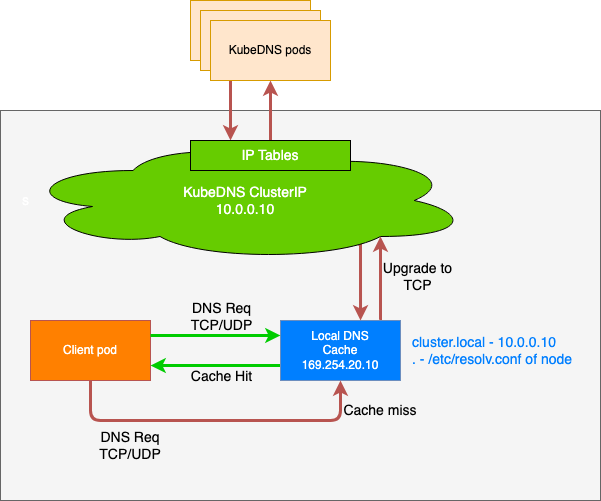
By default, DNS requests are sent to CoreDNS through the cluster network. NodeLocal DNSCache improves cluster DNS performance and resolves DNAT conntrack contention issues by running as a DaemonSet-based DNS caching proxy on cluster nodes.
After enabling NodeLocal DNSCache, the DNS query path is as follows:
## Usage
After enabling the NodeLocal DNS feature, the service cannot be used directly. You need to inject labels to automatically configure Pods for usage.
Currently, label injection is supported at the Namespace level. Once enabled for a Namespace, all services within that Namespace will use NodeLocal DNSCache:
```
kubectl label namespace node-local-dns-injection=enabled
```
When auto-injection is enabled, the following fields will be added to the Pod. To ensure maximum high availability of business DNS requests, the nameservers field will include an extra ClusterIP address of kube-dns as a backup DNS server.
```yaml
dnsConfig:
nameservers:
- 169.254.20.10
- 192.168.0.2 # The kube-dns address varies according to the cluster network configuration.
options:
- name: ndots
value: "3"
- name: attempts
value: "2"
- name: timeout
value: "1"
searches:
- default.svc.cluster.local
- svc.cluster.local
- cluster.local
dnsPolicy: None
```
#### Disabling NodeLocal DNSCache for Pods
If DNSConfig auto-injection is enabled for a Namespace and you need to exempt certain Pods from injection, you can modify the Labels field in the Pod Template and add the `node-local-dns-injection=disabled` label:
```yaml
apiVersion: apps/v1
kind: Deployment
metadata:
name: ubuntu
namespace: default
spec:
replicas: 1
selector:
matchLabels:
app: ubuntu
template:
metadata:
labels:
app: ubuntu
node-local-dns-injection: disabled # Disable auto-injection
spec:
containers:
- name: ubuntu
image: uhub.service.ucloud.cn/library/ubuntu:14.04.2
command: ["/bin/bash", "-c", "--"]
args: ["while true; do echo hello; sleep 10;done"]
```
#### Usage Notes
- Label injection is not supported for the kube-system and kube-public namespaces.
- For Pods using hostNetwork: DNSPolicy must be set to ClusterFirstWithHostNet.
- For Pods not using hostNetwork: DNSPolicy must be set to ClusterFirst.
## Issue Troubleshooting
### Stuck in Installation for Prolonged Periods
> This issue typically occurs due to insufficient resources.
- Execute the following commands to check if the two resources are normal:
```
kubectl -n kube-system get ds node-local-dns
kubectl -n kube-system get deployment nodelocaldns-webhook
```
- If resources are abnormal, use the following commands for further diagnosis:
```
kubectl -n kube-system describe ds node-local-dns
kubectl -n kube-system describe deployment nodelocaldns-webhook
```
## Reference Link
https://kubernetes.io/zh-cn/docs/tasks/administer-cluster/nodelocaldns